


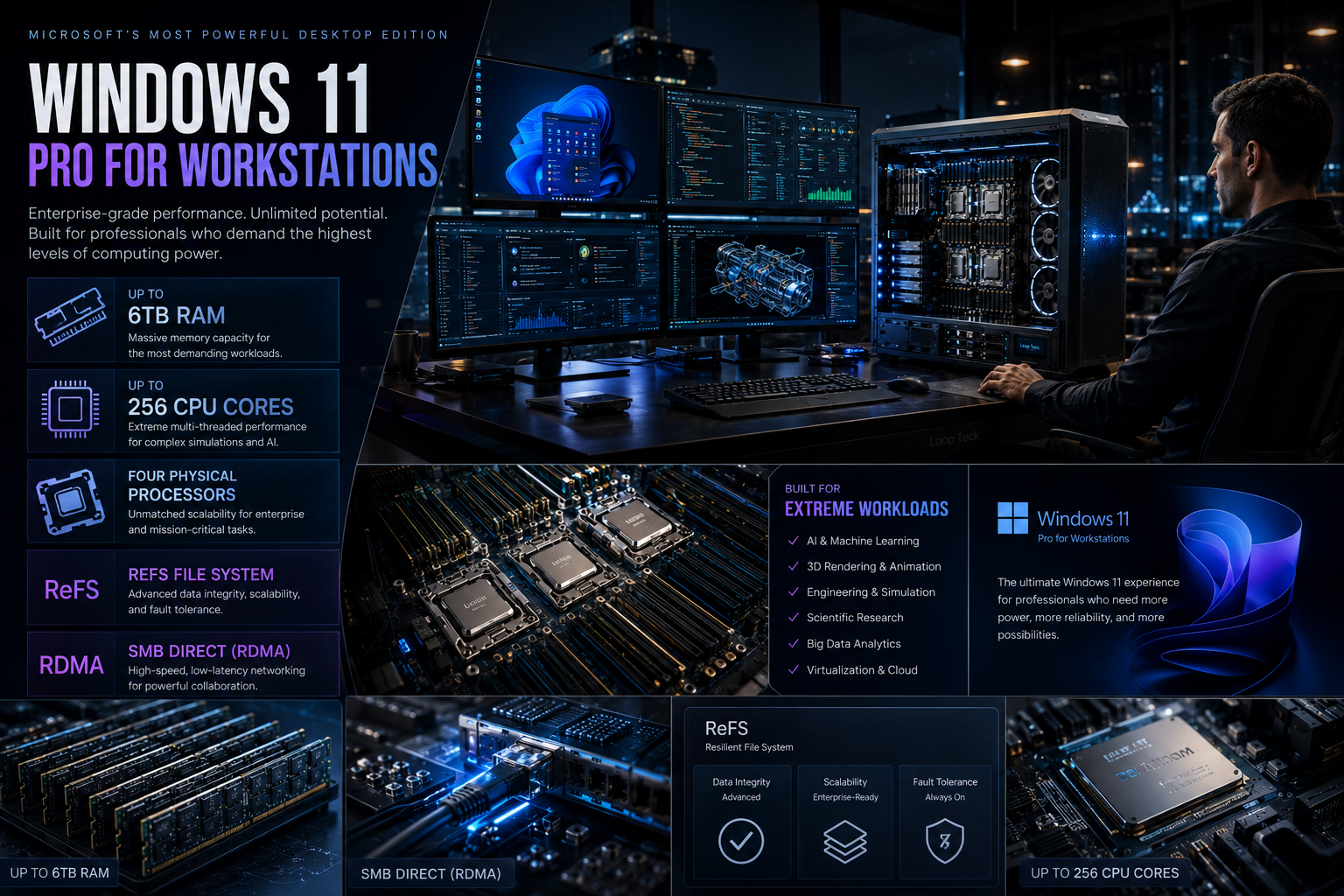
Enterprise-grade Windows 11 Pro for Workstations has quietly existed for years, yet most PC users have never realized how powerful it really is.
When people think of Windows 11, they usually picture the familiar Home and Pro editions that power millions of laptops and desktops worldwide. Hidden behind those mainstream versions, however, is a specialized edition that pushes Microsoft’s desktop operating system far beyond what most enthusiasts realize.
Windows 11 Pro for Workstations is Microsoft’s highest-end client edition for professionals who demand server-class capabilities without moving to Windows Server. Designed for engineers, researchers, AI developers, architects, video production studios, and enterprise professionals, the operating system dramatically expands hardware support while introducing advanced storage and networking technologies unavailable in the standard Windows 11 Pro experience.
Despite launching several years ago, the edition has remained surprisingly unknown outside professional IT circles. Yet it has always been available directly from Microsoft and is also pre-installed on select workstation systems from manufacturers including Dell and Lenovo.
For users running everyday workloads, the differences may never matter. But for organizations handling enormous datasets, scientific simulations, AI model development, or complex 3D rendering projects, Windows 11 Pro for Workstations represents a very different class of operating system.
Why Windows 11 Pro for Workstations Exists
Modern professional computing has changed dramatically over the last decade.
Artificial intelligence, machine learning, CAD design, 8K video editing, engineering simulations, virtualization, and scientific computing increasingly require hardware that exceeds the limitations of consumer PCs.
Microsoft created Windows Pro for Workstations specifically for these demanding environments.
Rather than replacing Windows Server, it fills the gap between consumer desktop operating systems and enterprise server deployments. Professionals can continue using a familiar Windows desktop while unlocking support for workstation-grade processors, significantly larger memory capacities, and technologies designed for data integrity and ultra-fast networking.
The result is an operating system intended not for gamers or casual users—but for organizations where performance, reliability, and scalability directly affect productivity.
Hardware Limits That Leave Standard Windows 11 Behind

Perhaps the biggest distinction is hardware scalability.
While Windows 11 Pro already supports powerful modern systems, Windows 11 Pro for Workstations raises those ceilings substantially.
Among its most notable capabilities are:
- Support for up to 6TB of physical memory
- Support for as many as four physical CPU sockets
- Up to 256 processor cores
- Certification for enterprise-class workstation processors
Those specifications place it in an entirely different category from standard desktop editions.
For perspective, most consumer gaming PCs today ship with between 16GB and 64GB of RAM, while even enthusiast workstations rarely exceed 256GB. A system equipped with multiple terabytes of memory is typically found inside research institutions, engineering firms, financial trading environments, or AI infrastructure.
Similarly, four physical processors are rarely seen outside enterprise workstations or specialized computational systems.
For ordinary users, these limits sound almost unimaginable. For certain industries, they are practical necessities.
Built for Xeon-Class Hardware

Unlike traditional consumer editions of Windows, the workstation edition is officially designed to support professional-grade processors commonly found in enterprise environments.
These include workstation CPUs engineered for continuous heavy workloads, higher memory bandwidth, larger cache capacities, and greater reliability than consumer desktop processors.
Such hardware is frequently deployed in:
- Engineering workstations
- Medical imaging systems
- Scientific laboratories
- Film production studios
- Financial modeling platforms
- AI development environments
- Large virtualization hosts
The operating system is optimized to recognize and efficiently manage these enterprise-focused hardware configurations without requiring Windows Server.
ReFS: A Storage System Designed Around Data Protection
Hardware isn’t the only area where Windows 11 Pro for Workstations separates itself.
One of its most valuable enterprise features is support for the Resilient File System (ReFS).
Traditional file systems prioritize compatibility and general-purpose computing. ReFS, on the other hand, was engineered with data resilience as a primary objective.
It continuously monitors stored data for corruption and can automatically detect and repair damaged files when used with compatible storage configurations.
For organizations managing enormous datasets—or archives containing irreplaceable project files—this additional layer of protection helps reduce the risk of silent data corruption.
That makes ReFS especially attractive for industries working with:
- Large engineering projects
- Scientific research datasets
- Video production archives
- Enterprise backup repositories
- Virtual machine storage
Rather than simply storing files, the file system actively contributes to maintaining data integrity over time.
SMB Direct Brings Faster, Lower-Latency Networking
Storage isn’t the only enterprise-focused enhancement in Windows 11 Pro for Workstations. Microsoft also includes support for SMB Direct, a feature built on Remote Direct Memory Access (RDMA) networking technology.
In a conventional network transfer, data typically passes through the CPU before reaching its destination. That process works well for everyday file sharing but becomes increasingly inefficient when moving massive datasets between high-performance systems.
RDMA changes the equation by allowing compatible network adapters to transfer data directly between computers with minimal CPU intervention. The result is significantly lower latency, reduced processor overhead, and higher throughput—particularly valuable in environments where large files move constantly across the network.
This capability is especially beneficial for organizations that rely on:
- High-speed shared storage
- Video production pipelines
- Scientific computing clusters
- Virtualization infrastructure
- AI and machine learning workflows
For a home user copying family photos, the difference may be negligible. For a studio transferring multi-terabyte video projects every day, it can translate into meaningful time savings.
Support for Persistent Memory
Another feature rarely discussed outside enterprise IT is support for NVDIMM (Non-Volatile Dual In-line Memory Module) hardware.
Persistent memory occupies a unique space between traditional RAM and storage. Unlike standard system memory, it can retain data even after a sudden power interruption while still delivering memory-class performance for supported workloads.
Although this technology remains relatively uncommon due to its cost and specialized use cases, it has proven valuable in sectors where minimizing downtime and preserving in-memory data are critical.
Applications that benefit include:
- Large database systems
- Financial transaction platforms
- Industrial automation
- High-performance computing
- Specialized enterprise applications
For most consumers, this feature will never come into play. For businesses operating mission-critical infrastructure, however, it can improve resilience and reduce recovery times after unexpected outages.
How It Compares With Windows 11 Pro
At first glance, Windows 11 Pro and Windows 11 Pro for Workstations look almost identical. They share the same familiar desktop, Start menu, multitasking tools, and security features.
The real differences appear under the hood.
While Windows 11 Pro is designed to satisfy the needs of businesses, enthusiasts, and professionals using conventional hardware, the Workstations edition removes several of the hardware and feature limitations that would otherwise restrict enterprise-grade systems.
Key distinctions include:
Windows 11 Pro vs Windows 11 Pro for Workstations
Professional feature comparison for power users and enterprise workstations.
| Feature | Windows 11 Pro | Windows 11 Pro for Workstations |
|---|---|---|
| Maximum RAM |
2 TB
|
6 TB
|
| Physical CPU Support |
2 CPUs
|
4 CPUs
|
| Maximum CPU Cores |
128
|
256
|
| ReFS Support | ✖ No | ✔ Yes |
| SMB Direct (RDMA) | ✖ No | ✔ Yes |
| Persistent Memory | Limited | ✔ Full Support |
| Target Audience | Standard Business PCs | High-End Professional Workstations |
These enhancements don’t make everyday computing faster by themselves. Instead, they enable hardware configurations and enterprise technologies that standard editions of Windows simply aren’t designed to handle.
Who Should Actually Buy It?
The impressive specifications naturally raise an important question:
Should enthusiasts or gamers consider upgrading?
For the overwhelming majority of users, the answer is probably not.
Most gaming systems, creative workstations, and business laptops never approach the hardware limits imposed by Windows 11 Pro. Even demanding workloads such as modern gaming, software development, photo editing, and standard video production perform exceptionally well on the regular Pro edition.
Windows 11 Pro for Workstations is aimed at a much narrower audience, including:
- AI and machine learning developers
- Scientific researchers
- Engineers running complex simulations
- Architecture and CAD professionals
- Large-scale video production studios
- Virtualization specialists
- Data scientists
- Enterprise IT departments
- Organizations deploying server-class workstations
Unless your workload genuinely requires multiple processors, terabytes of RAM, or advanced enterprise networking, the additional capabilities are unlikely to provide a noticeable benefit.
The Price Reflects Its Intended Audience
Windows 11 Pro for Workstations carries a significantly higher price than the standard Pro edition.
That premium reflects its specialized feature set rather than cosmetic differences.
Organizations investing in workstation-grade hardware often spend thousands—or even tens of thousands—of dollars on a single system. Within that context, paying more for an operating system that unlocks advanced storage, networking, and hardware capabilities represents a relatively small portion of the overall investment.
For individual consumers, however, the extra cost can be difficult to justify if they won’t use the additional enterprise features.
As a result, many workstation buyers receive the operating system pre-installed from OEM manufacturers rather than purchasing it separately.
Why It Has Remained Largely Unknown
Despite being available through Microsoft’s official channels, Windows 11 Pro for Workstations has remained one of the company’s least-discussed desktop editions.
There are several reasons for that.
First, the target audience is exceptionally small compared with the hundreds of millions of users running Windows Home or Windows Pro.
Second, Microsoft rarely promotes the edition outside enterprise documentation and workstation-focused sales channels.
Finally, most technology coverage naturally centers on features relevant to mainstream users—such as AI capabilities, gaming performance, security updates, and major Windows releases—leaving niche enterprise editions largely out of the spotlight.
That combination has allowed one of Microsoft’s most capable desktop operating systems to remain something of a hidden offering, despite being publicly available for years.
What This Means for the Future of Professional Windows PCs
The renewed attention surrounding Windows 11 Pro for Workstations highlights a broader trend in professional computing.
As artificial intelligence, data analytics, engineering, and content creation continue to demand increasingly powerful hardware, operating systems must evolve alongside those workloads.
Rather than pushing every professional toward Windows Server, Microsoft continues to offer a desktop environment capable of scaling with enterprise-class workstations.
For businesses building AI development systems, advanced rendering machines, or research platforms, that flexibility reduces complexity while preserving the familiar Windows experience.
At the same time, the existence of this edition serves as a reminder that Microsoft’s Windows ecosystem extends well beyond the versions most consumers encounter.
Final Thoughts
Windows 11 Pro for Workstations isn’t a hidden operating system in the literal sense—it’s available directly from Microsoft and has been shipping with premium workstation hardware for years. What makes it remarkable is how little attention it has received outside enterprise circles.
With support for up to 6TB of RAM, four physical processors, 256 CPU cores, ReFS, SMB Direct, and persistent memory, it occupies a unique position between traditional desktop Windows and Windows Server.
For everyday users, Windows 11 Pro remains the right choice. Its hardware limits already exceed what most consumer systems will ever require.
But for professionals tackling computationally intensive workloads, managing massive datasets, or deploying server-class workstations, Windows 11 Pro for Workstations offers capabilities that few desktop operating systems can match—all while retaining the familiar Windows interface and application ecosystem.
As AI-driven workflows and high-performance computing become more common, this once-overlooked edition may finally receive the recognition it has quietly deserved.


Loop Teck
Future Technology • AI • Smartphones • Innovation